

Knowledge Base for Agents
- Support Agent
- Ops Admin
Knowledge Base for Agents
The Knowledge Base holds articles that clients can read before they raise a ticket. As a Support Agent you can browse and read every article available to you. Ops Admins write and publish them.
Browsing articles
Open Support Desk › Knowledge Base.
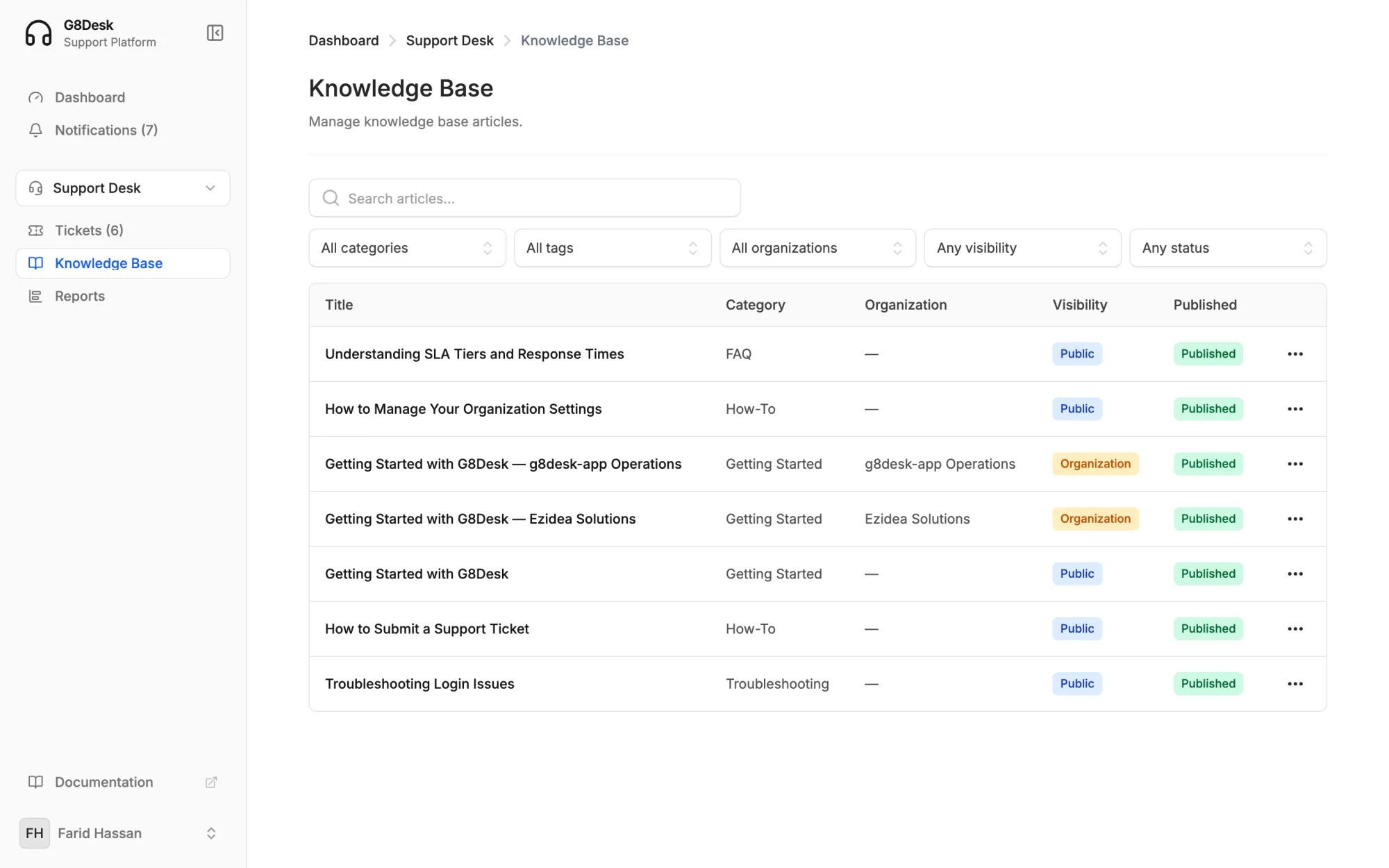
- Search articles… matches article titles.
- Filter by category, tag, organisation, visibility (Public or Organization) and status (Published or Draft).
- Clear resets the filters.
- Open the ⋯ menu on a row and choose View to read the article.
Visibility
| Visibility | Who can read it |
|---|---|
| Public | Every client organisation |
| Organization | Only the named client organisation |
The list shows public articles and organisation-only articles for organisations you work with. Draft articles are not yet visible to clients.
Tip: Each client organisation gets an automatically maintained article in the SLA & Escalation category, regenerated every night from its live contract and SLA settings. Point clients to it when they ask about response times.
Using articles while handling tickets
- Search the Knowledge Base before you investigate. The answer may already be written up.
- When an article answers the client's question, send them the article title or link in your reply.
- If you keep answering the same question, suggest an article to an Ops Admin with the question and the answer you usually give.